Google dropped a major update to Stitch on March 18, 2026. Figma's stock fell 8.8% the same day. The tool is free.
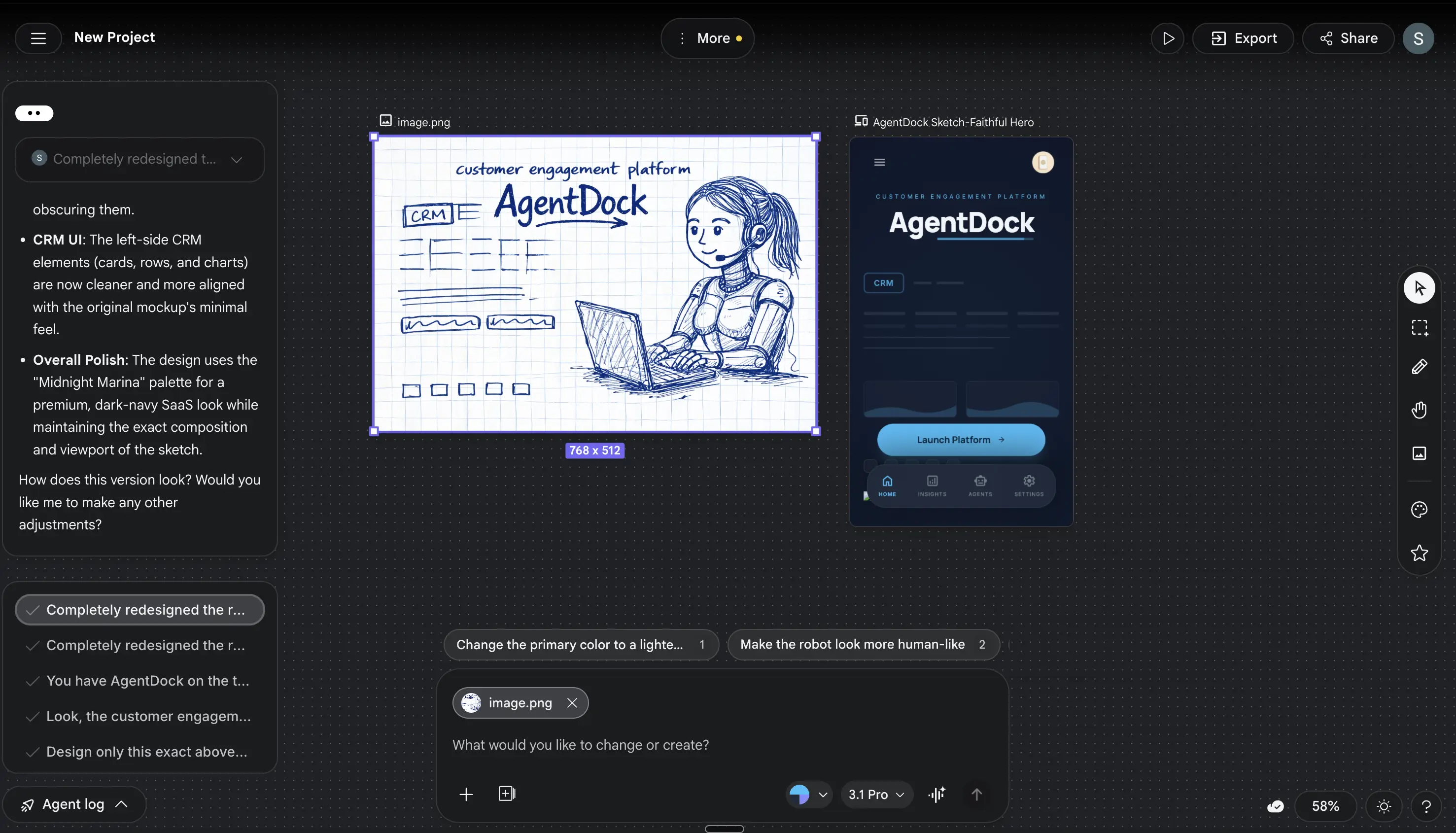
Google Stitch is a design platform from Google Labs that turns text prompts, voice commands, sketches, and screenshots into layered UI designs with exportable code. It launched in mid-2025 as a simpler tool. The March 2026 update rebuilt it into something much more ambitious: an AI-native infinite canvas with Figma import, voice interaction, and an MCP server that connects directly to coding tools.
This guide covers what Stitch does now, how the update changes things, where it works well, and where it falls short.
How Google Stitch Works
No download, no install, no waitlist. Sign in with a Google account at stitch.withgoogle.com, and you're on an infinite canvas powered by Gemini models. The whole thing runs in the browser.
The core loop: describe what you want, Stitch builds it, you refine with follow-up prompts or voice commands or direct edits. When you're satisfied, export as code, paste into Figma, or push to a coding tool like Antigravity or Claude Code through an MCP server.
Every other AI design tool has a version of this loop. The difference is what's happening underneath. Stitch doesn't generate flat mockup images. It generates structured, layered UI with actual HTML/CSS behind every element. Paste a Stitch design into Figma and the layers are named, components are grouped, Auto Layout is preserved. Export the code and you get responsive HTML and Tailwind CSS that renders correctly. A dashboard layout export came back clean enough to use. That almost never happens with AI design tools.
| Component | What It Does |
|---|---|
| Gemini 3.0 Flash | Standard mode generation (fast, good enough for drafts) |
| Gemini 3.1 Pro | Experimental mode (higher fidelity, slower, limited quota) |
| Design Agent | Tracks full project history, suggests directions, generates variants |
| Agent Manager | Runs multiple design branches in parallel |
| Voice Canvas | Real-time voice interaction with live updates |
| MCP Server | Connects Stitch to coding tools (Antigravity, Cursor, Claude Code, Gemini CLI) |
The Design Agent is what separates Stitch from simpler text-to-UI generators. It reasons across your entire project's evolution, not your last prompt alone. Ask it to "make this more professional" and it tracks what "this" refers to, what you've changed before, what direction the project is heading. That context window turns a prompt tool into something closer to a collaborator.
The March 2026 Update: What Changed
Google announced this on March 18, 2026. Not a minor patch. The entire platform was rebuilt around an "AI-native infinite canvas" concept.
Vibe Design
Google's term for describing intent instead of specifying components. Traditional design: "I need a hero section with a gradient background, 48px heading, two CTAs, and a testimonial grid." Vibe design: "I want a landing page that feels premium and trustworthy for a B2B SaaS product."
Stitch generates multiple design directions from that description. You pick the closest one, then refine. Exploring ten directions in two minutes beats building one direction in two hours.
The catch: vibe design falls apart the moment you need precision. "Make the button 2px bigger" is not a vibe. It's a spec. Stitch handles specs poorly compared to vibes. This is the fundamental tension in the tool, and it shows up in every workflow.
Voice Canvas
You can talk to Stitch now. Say "give me three different menu layouts" or "switch this to a dark theme with blue accents" and the agent makes changes in real time. It can also interview you about your design goals before generating anything, which turns out to be useful for people who don't know what they want yet.
The voice feature works. It is not a gimmick. But natural language is imprecise by nature, and voice amplifies that. "Make it pop" means something different to every person. Stitch guesses, and sometimes the guess is wrong. The iteration speed makes up for the miss rate.
Direct Edits
Before this update, changing a typo meant re-prompting or exporting to Figma. Now you edit text, swap images, and adjust spacing directly on the canvas. Most requested feature since launch, and it was overdue.
DESIGN.md
This is the feature that matters most if you ship code. DESIGN.md is a markdown file that captures your design system: colors, typography, spacing, component patterns. Extract one from any URL, export it from a Stitch project, or import one to keep brand consistency across projects.
The real value is that DESIGN.md is agent-friendly. Feed it to Antigravity, Claude Code, or Cursor, and those tools can generate code that matches your design system. It bridges "AI designed this" and "this looks like our brand." More on this pipeline below.
Interactive Prototyping
Connect screens into clickable flows. Hit "Play" to preview. Stitch auto-generates logical next screens based on navigation patterns. Click a "Sign Up" button on the landing page and Stitch generates a registration form that matches the design style.
This existed since December 2025 but got a real upgrade. The auto-generated screens are more coherent now, less random. Still not perfect, but usable.
How to Use Google Stitch (Step by Step)
Step 1: Sign Up
Go to stitch.withgoogle.com. Sign in with any Google account. No credit card. No onboarding flow. You're on the canvas in under 30 seconds.
Step 2: Choose Your Mode
Four generation modes. Pick before you prompt.
| Mode | Model | Best For | Monthly Quota |
|---|---|---|---|
| Standard | Gemini 3.0 Flash | Quick drafts, MVPs, exploration | ~350 generations |
| Experimental | Gemini 3.1 Pro | High-fidelity designs, polished output | ~50-200 generations |
| Redesign | NanoBanana Pro | Uploading screenshots and getting a modern version | Varies |
| Ideate | Gemini 3 | Exploring problem spaces before designing | Varies |
Standard mode is where you'll spend 80% of your time. Experimental produces noticeably better output but burns through your quota fast.
Step 3: Write a Detailed Prompt
Specificity wins. Vague prompts produce generic output. Detailed prompts produce usable designs.
Vague (produces generic output): "Design a dashboard."
Specific (produces something useful): "Design a mobile dashboard for a crypto tracking app. Include a top navigation bar with logo and notification bell, a portfolio summary card showing total value and percentage change, a pie chart for asset distribution, a horizontal scroll section for trending coins, and a bottom navigation bar. Dark theme, green accents, rounded corners."
Three sentences of context can save ten rounds of back-and-forth. Include: target device, theme preference, color direction, component list, and the feeling you're going for.
Step 4: Upload Visual References (Optional)
In Experimental mode, you can upload screenshots, whiteboard sketches, or mood board images. Stitch uses them as visual inspiration alongside your text prompt. Works particularly well for redesign projects where you have an existing interface to modernize.
Step 5: Iterate and Refine
Select screens and prompt refinements. Shift+click to multi-select screens and apply theme changes across all of them simultaneously. This keeps visual consistency when you're adjusting colors or typography across a flow.
Use the chat interface for targeted changes: "Make the CTA button larger," "Add a testimonial section below the fold," "Switch to a sans-serif font." Each iteration uses one generation from your quota.
Step 6: Export
Five options:
- Copy to Figma preserves layers, Auto Layout, and component grouping
- Download HTML/CSS gives you responsive web code
- Send to AI Studio adds backend logic and API connections
- MCP Server pushes designs to Antigravity, Cursor, Claude Code, or Gemini CLI
- ZIP Download archives all assets and code
What You Can Build with Stitch (And What You Can't)
SaaS Landing Pages
A detailed prompt like "clean SaaS pricing page with three tiers, annual/monthly toggle, feature comparison, social proof section, and FAQ accordion" generates a complete, responsive page in under 30 seconds. The HTML/CSS output is clean enough to deploy directly for an MVP landing page.
Quality check: Layout and structure are solid. Typography choices are safe but generic. You'll want to customize fonts, adjust spacing details, and replace stock content. Budget 30 minutes of polish after generation.
Mobile App Flows
Multi-screen prototypes (onboarding, order tracking, payment confirmation, ratings) with clickable transitions. The auto-generated next screens are inconsistent. Sometimes the registration form matches the landing page perfectly. Sometimes it introduces a completely different design language mid-flow.
Dashboard UIs
Dark-themed analytics dashboards with charts, tables, and stat cards generate well. Light-themed dashboards are less consistent. The chart components look good but are purely visual, no real data binding.
E-Commerce Interfaces
Product grids, cart flows, checkout pages. These generate reliably because e-commerce UI has strong conventions the model has trained on extensively.
What It Doesn't Build Well
Stitch can't handle complex multi-panel desktop applications, data-heavy enterprise interfaces with dozens of states, micro-interactions (hover effects, loading animations, scroll behaviors), or custom illustration-heavy pages.
If your design depends on nuance, Stitch will get you 60% of the way and the remaining 40% will take as long as doing it from scratch. That 60% is still valuable. But go in knowing where the wall is.
Stitch Can't Do Collaboration. That Matters More Than Everything It Can Do.
Every YouTube review focuses on the generation quality. "Look at this landing page it made in 30 seconds!" Fine. The output is impressive. But the thing that will determine whether Stitch becomes a real tool or stays a demo is the part nobody talks about in their reaction videos: it's single-player only.
No real-time collaboration. No comments. No version history. No team workspaces. If you work with anyone else, your workflow becomes: design in Stitch, export to Figma, collaborate in Figma. Stitch handles the exploration. Figma handles the work.
This isn't a feature gap they'll patch in a sprint. Multiplayer design infrastructure is hard. Figma spent years building CRDT-based real-time collaboration, and it's still the thing that makes Figma, Figma. Google building this into Stitch would mean rebuilding the tool from the collaboration layer up.
Until they do, Stitch stays in the "cool for solo work" category. That limits its ceiling.
Here's the full list of what you'll run into:
No Design System Management
You can import a DESIGN.md, but you can't enforce component libraries, design tokens, or brand guidelines across projects the way Figma does. For a one-off prototype, fine. For a team maintaining consistency across 50 screens, dealbreaker.
HTML/CSS Only
No React, Vue, or SwiftUI export. Building a React app (most startups are)? You'll convert the HTML output yourself or use the MCP pipeline to have a coding agent handle it. Native mobile teams are completely left out.
AI Inconsistency
Complex layouts sometimes require multiple iterations. The agent can forget components you liked from a previous version or reinterpret them in unexpected ways. Color contrast and touch targets often need manual review. Accessibility auditing is unreliable.
No Micro-Interactions
Prototypes handle screen transitions but can't design loading animations, hover effects, scroll behaviors, or any of the small interactions that make real products feel polished.
No Backend Logic
Generated interfaces are static. Form submissions don't work. Buttons don't route. You get the frontend visual layer only. Everything functional requires developer implementation.
Generation Quota Limits
350 monthly generations sounds generous until you're iterating on a complex project. Power users will hit the wall by mid-month. No way to buy more yet.
Google Stitch vs. Figma vs. Framer vs. v0: The Honest Comparison
| Feature | Google Stitch | Figma | Framer | v0 (Vercel) |
|---|---|---|---|---|
| Primary input | Text, voice, images | Manual canvas design | Manual + AI assist | Text prompts |
| Learning curve | Minutes | Weeks to months | Days to weeks | Minutes |
| AI generation quality | High (Gemini 3.x) | Basic (Figma AI) | Medium | High (focused on React) |
| Code output | HTML + Tailwind CSS | CSS snippets via Dev Mode | React (built-in publishing) | React + Tailwind |
| Figma integration | One-click paste with layers | Native | Import from Figma | None |
| Collaboration | Single-player only | Industry-leading multiplayer | Multiplayer (limited) | Single-player |
| Design systems | DESIGN.md import/export | Full component libraries, tokens, variables | Basic | None |
| Prototyping | AI-generated clickable flows | Manual wiring with transitions | Built-in with CMS | Static output |
| Plugin ecosystem | None | 2,000+ community plugins | Growing | None |
| Responsive design | AI-generated variants | Manual Auto Layout | Built-in | AI-generated |
| Voice input | Yes, with live critiques | No | No | No |
| Backend integration | Via AI Studio + MCP | None (design only) | Built-in CMS + hosting | None |
| Price | Free (350 gen/mo) | $12-90/seat/month | $0-30/month | $0-20/month |
| Best for | Rapid exploration + prototyping | Production design at scale | Marketing sites | React component generation |
Stitch vs. Figma
Stitch wins on exploration speed. Ten design directions in two minutes. Figma can't do that, AI features or not. For solo founders, freelancers, and developers who need a UI but don't want to learn design tools, obvious choice.
Figma wins on everything after exploration. Team collaboration, design systems, pixel-level control, component libraries, version history, handoff specs, 2,000+ plugins. If you have a design team shipping production apps, Figma is not threatened today.
Stitch vs. Framer
Different game entirely. Framer is a design tool AND a hosting platform. You design, you publish, it's live. Stitch generates code you still have to deploy somewhere. If you want a marketing site live by Friday, Framer. If you want to explore ten directions before committing, Stitch.
Stitch vs. v0
Here's where I disagree with most of the YouTube coverage. People keep saying Stitch has better output quality than v0. Depends on what you mean by "quality." Stitch produces better-looking designs. v0 produces more usable code. If you want a React component with proper state management and Tailwind styling, v0 wins. If you want a high-fidelity mockup to show a stakeholder, Stitch wins. These tools barely overlap in practice.
The DESIGN.md + MCP Pipeline (For Developers)
This is where Stitch stops being a design toy and starts being infrastructure. The workflow Google is building here goes beyond "generate a pretty picture."
Step 1: Design in Stitch. Get the look and feel right.
Step 2: Export DESIGN.md. This captures your colors, typography, spacing rules, and component patterns in a markdown format that AI coding agents understand.
Step 3: Install the Stitch MCP server in your coding environment:
{
  "mcpServers": {
    "stitch": {
      "command": "npx",
      "args": ["@_davideast/stitch-mcp", "proxy"]
    }
  }
}
Step 4: Your coding agent (Antigravity, Claude Code, Cursor, Gemini CLI) can now pull Stitch designs directly. The MCP server provides three tools: build_site (maps screens to routes), get_screen_code (retrieves HTML), and get_screen_image (downloads screenshots as base64).
Step 5: Tell your coding agent to build the app using the Stitch designs as the frontend and DESIGN.md as the style guide. The agent generates functional code that matches your designs.
This pipeline works. The HTML/CSS sometimes needs cleanup before it's production-ready, but going from text prompt to deployed frontend without manually writing CSS is real. A three-screen prototype pushed through Claude Code needed about 20 minutes of cleanup. Dramatically less than building from scratch.
The gap: backend logic. Stitch designs are static. You still wire up API calls, state management, authentication, and everything else that makes an app function. The frontend is the easy part of most products. Stitch makes the easy part easier. The hard part stays hard.
Pricing and Quotas
Google Stitch is free. No credit card, no subscription, no paid tiers. Sign in with a Google account and start generating.
| Mode | Monthly Limit | Model |
|---|---|---|
| Standard | ~350 generations | Gemini 3.0 Flash |
| Experimental | ~50-200 generations | Gemini 3.1 Pro |
Each prompt iteration counts as one generation. A five-screen prototype with three rounds of refinement per screen uses 15 generations. At that rate, 350 monthly generations cover about 23 prototypes in Standard mode. Generous for most individual users.
Will it stay free? Google hasn't announced paid tiers. The tool lives in Google Labs, which is Google's experimental playground. Products either graduate from Labs into paid products, get absorbed into existing products, or get killed. Stitch is growing fast enough that paid tiers seem inevitable.
The strategic play is obvious: Google is running the Google Docs playbook. Give it away, capture the market, monetize enterprise features (collaboration, compliance, SSO) later. The individual creator stays free. The 20-person team pays.
Who Should Use Stitch (And Who Shouldn't)
Best for:
- Solo founders who need a clickable prototype before spending money on development
- Developers who can code the backend but hate designing the frontend. Stitch gives you the visual layer, you build the rest
- Designers in the ideation phase who want to explore 10 directions before committing to one in Figma
- Product managers who need to show stakeholders a vision before sprint planning
- Freelancers pitching concepts to clients. Three directions in an hour instead of one direction in a day
- Students building portfolio projects without budget for Figma's paid tiers
Skip if:
- Your team ships production apps at scale. You need Figma's collaboration, design systems, and plugin ecosystem
- You're building native mobile. No iOS or Android code export
- Brand consistency is non-negotiable. DESIGN.md is a workaround, not a design system
- You need micro-interactions. No animation, no hover states, no scroll effects
- You're an agency with brand-critical clients. AI inconsistency means every output needs human review before client delivery
Are Designers Finished?
The job description is changing. The role itself survives.
What Stitch automates: the blank-to-layout phase. Generating initial concepts, exploring directions, producing rough prototypes. This used to take hours or days. Now it takes minutes.
What Stitch cannot do: make judgment calls about information hierarchy. Understand the emotional subtext of a brand. Build design systems that scale across 200 screens and 15 developers. Conduct user research and translate findings into interface decisions. Handle the politics of getting a design approved by six stakeholders with conflicting opinions.
The designer who only does layout is in trouble. That work is getting automated. The designer who does strategy, research, systems thinking, and judgment is more valuable than ever, and will use Stitch to move faster.
The practical 2026 workflow for most teams: Explore in Stitch, refine in Figma, build in Antigravity. Three tools, three phases, each doing what it does best.
If you're a designer reading this, learn these AI tools. The designer who uses them will replace the designer who doesn't.
After the Export: Turning Stitch Output into a Real Product
Stitch gives you the frontend. The rest of the product (API calls, state management, authentication, deployment) is still on you. The MCP pipeline helps bridge design to code, but you're writing prompts for Claude Code or Cursor either way.
Good prompts make that step faster. The AgentDock prompt library has coding and development prompts built for exactly this workflow: taking generated HTML/Tailwind output and turning it into a functional application. If you're pushing Stitch designs through a coding agent, the prompt you feed that agent matters as much as the design itself.
Frequently Asked Questions
Is Google Stitch really free?
Yes. No credit card, no subscription. You get 350 generations per month in Standard mode and 50-200 in Experimental mode. Google hasn't announced paid tiers. The tool lives in Google Labs, so pricing could change as it matures, but right now there's zero cost.
Can Google Stitch replace Figma?
Not today. Stitch replaces the exploration phase (going from idea to rough prototype). Figma owns the refinement phase (pixel-level control, design systems, team collaboration, developer handoff). Most professional workflows will use both. Stitch is a starting point, not an endpoint.
What code does Google Stitch export?
HTML and Tailwind CSS. The output is responsive, follows modern web standards, and is clean enough to use directly for simple projects. No React, Vue, or SwiftUI export yet. For React projects, use the MCP server to feed Stitch designs into a coding agent that handles the conversion.
Does Google Stitch work with Figma?
Yes. Click "Copy to Figma" and paste into a Figma file. Layers are preserved with proper naming, components are grouped, and Auto Layout structure is intact. You get editable, organized layers, not a flat image.
How does DESIGN.md work?
DESIGN.md is a markdown file that captures your design rules (colors, fonts, spacing, component patterns) in a format AI agents can read. Extract one from any URL or Stitch project, then import it into other projects or coding tools. It ensures AI-generated designs match your brand instead of starting from defaults every time.
Can I use Google Stitch for mobile app design?
Stitch generates mobile UI designs and interactive prototypes. The visual output works well for mobile. The limitation is code export: HTML/CSS only, targeting mobile web, not native iOS or Android. For native mobile development, you'd use Stitch for the visual mockup and build natively using the design as reference.
What is "vibe design"?
Google's term for describing design intent through natural language and feelings rather than technical specifications. Instead of "48px heading, blue gradient, two-column layout," you say "premium, trustworthy, modern B2B feel." Stitch generates multiple directions matching that vibe. Works well for initial exploration, poorly for precise adjustments.
How does Google Stitch compare to v0?
Both take text prompts and generate UI. v0 outputs React components with proper state management and Tailwind styling. Stitch outputs HTML/CSS with higher visual fidelity and more design tool features (voice input, infinite canvas, Figma integration, prototyping). Choose v0 for React code. Choose Stitch for design exploration and prototyping.
What's the Stitch MCP server?
MCP (Model Context Protocol) lets Stitch connect with coding tools. Install the Stitch MCP server and tools like Antigravity, Claude Code, Cursor, or Gemini CLI can pull your Stitch designs directly, retrieving the HTML, screenshots, and routing structure. This creates a pipeline from design to functional code without manual file transfers.
Will Google kill Stitch like other Labs projects?
It's a real risk. Google Labs is experimental, and Google has a track record of killing products. But Stitch is growing fast (search volume went from 140/month to 40,500/month in one year), directly competes with a $20B market (Figma), and integrates deeply with Google's AI ecosystem. More likely to graduate into a standalone product or merge into Google Workspace than to get killed.
The Bottom Line
The interesting question isn't whether Stitch is good today. It's what happens when Google adds collaboration, React export, and design system enforcement over the next 12 months. Every limitation listed above is a software problem, not a fundamental constraint. And Google ships fast when a product has traction.
If you're a developer or founder prototyping a product, start at stitch.withgoogle.com with a detailed prompt and see how far it gets you. If you're a designer, learn the tool now while the ceiling is still low. The ceiling won't stay low.
The design industry runs on a 3-year adoption curve. Stitch is at month 10. Check back at month 24.